TL;DR: A business process is the repeatable path from a trigger to a clear result. To improve one, choose a frequent, painful workflow; watch how it really happens; map the steps, decisions, owners, and exceptions; then simplify before automating. Test the revised process, assign an owner, and keep it current. You can start with one workflow this week.
If a customer request gets handled differently depending on who answers, or a job stalls because one person knows the next step, you have a process problem, not a people problem. The process may be unwritten, outdated, or built around workarounds. Either way, it is difficult to improve what you cannot see.
This guide gives you a practical way to uncover, map, improve, and maintain the work your business does every day. You do not need special software to begin. You do need honest input from the people doing the work.
Why business processes break
Most processes do not start out chaotic. They become that way over time.
- Knowledge stays in people’s heads. A veteran employee remembers which supplier to call or how to handle a missing form. A new employee has to guess.
- Growth outpaces habits. A routine that worked when one person handled every request may fail when several employees, locations, or systems are involved.
- Exceptions turn into workarounds. Someone creates a spreadsheet, sends a private message, or skips a step to keep work moving. Soon, the workaround is part of the process, but nobody has reviewed its risks.
Picture a dispatcher rebuilding the morning schedule after a cancellation. The information may be spread across calls, paper tickets, and someone’s memory. Each person involved does their best, but the business has no shared path for deciding what happens next.
The takeaway: Do not start by blaming the person who missed a step. Find the conditions that made the step easy to miss.
What a process actually is
A process is a repeatable path from a trigger to a defined result. It includes the actions, decisions, owners, handoffs, and exceptions needed to get there.
A binder of procedures is not automatically a process. If people cannot find or use it during real work, it is paperwork, not an operating tool. A useful process document helps someone understand what to do, when to do it, who takes over next, and what counts as complete.
For example, “handle new service calls” is too broad to guide work. A clearer process starts when a call comes in and ends when the request is either booked, declined with a reason, or routed for follow-up.
Find your real processes with a chaos audit
Map the work, not the org chart. Start with three workflows that are both repeated and painful. Examples might include handling a new customer request, preparing an estimate, receiving materials, or turning a completed job into an invoice.
For each workflow:
- Choose a real recent example. Walk through what happened from the first trigger to the final result.
- Ask the people doing the work to show you. Watch the actual steps. Do not rely only on how the process is supposed to work.
- Record every handoff and workaround. Include waiting, duplicate entry, missing information, side conversations, and rework.
- Mark where people have to guess. Note unclear decisions, approvals, and ownership.
- Ask what happens when things go wrong. Capture the exceptions the team sees often.
A small manufacturer might discover that a rush order is logged in one place, checked against inventory in another, and verbally flagged to production. A clinic might find that appointment changes are recorded differently depending on who takes the call.

The U.S. Small Business Administration encourages small businesses to document and standardize their processes for consistency and easier training. NIST’s Baldrige operations guidance similarly describes designing work as a set of regular, repeatable steps that meet defined requirements. Keep the first map simple: decide where the workflow starts and ends, then capture only enough detail to see how work moves.
The takeaway: Your current process includes the workarounds. Write them down before you decide what to change.
Map a workflow in one afternoon
You can create a useful first map with a whiteboard, sticky notes, or a document. Use rectangles for actions, diamonds for yes-or-no decisions, and arrows to show what happens next. For each step, record:
- Trigger: What starts the process?
- Action: What needs to happen?
- Owner: Who is responsible for this step?
- Decision: What question determines the next path?
- Done: What result or record confirms the step is complete?
- Failure path: What happens if information is missing, the system is unavailable, or the request cannot proceed?
Keep one owner accountable for each step, even if others help. That does not mean one person must do everything. It means everyone knows who is responsible for moving the work forward.
Copyable mini-SOP: Inbound service call to booked job
Illustrative example. Adjust the service-area rules, safety guidance, booking criteria, and escalation steps to fit your business.
Purpose: Record and route a new service request consistently.
Trigger: An inbound call requesting service.
Owner: The person answering or returning the call.
Done means: The request is recorded and either booked, declined with a reason, or assigned for follow-up.
- Answer and identify the request. Record the caller’s name, preferred contact method, service address, and a short description of the issue.
- Check whether the request fits your service rules. Confirm the location and type of work are within the business’s approved service area and scope. If not, explain the next step and record the outcome.
- Check for urgent safety concerns. Follow your company’s approved safety and escalation procedure. Do not improvise technical advice or promise a response time you cannot confirm.
- Check the booking rules and availability. If the request qualifies and an appropriate slot is available, offer the options allowed by your scheduling rules.
- Confirm the appointment. Repeat the agreed date, time window, address, and contact details. Tell the caller what preparation, if any, is required.
- Create the record. Enter the call details, status, appointment, and any promised follow-up in the agreed system. Assign the next owner if another person must act.
- Close the loop. Send or provide the confirmation using the approved method. Mark the request booked only when the appointment and record are complete.
If the process cannot continue: If there is no suitable slot, required information is missing, or the system is unavailable, record the issue and assign a named person to follow up. Do not leave the request in an unowned queue.
For each step, you can add the exact system or form to use once the basic path is clear. Avoid adding detail that does not help someone perform the work reliably.
Design the better version
Do not automate the existing mess. First, challenge each step in this order:
| Action | Ask |
|---|---|
| Remove | Does this step prevent a real problem, or is it leftover work? |
| Combine | Can two checks or handoffs happen together without losing control? |
| Automate | Is the task repetitive, rules-based, and safe to check? |
| Delegate | Should a trained person own the task or decision instead? |
Use human judgment where context, safety, customer needs, or unusual circumstances matter. Favor consistency where the task follows clear rules, such as checking that required fields are present or sending a standard confirmation.
After redesigning the process, compare it with the current version. Did you remove a needless wait? Make an owner clear? Add a safer route for an exception? Decide what you will measure before calling the change an improvement.
Make the process stick
A process is not finished when the document is saved. It must be findable, usable, and maintained.
- Name an owner who can answer questions and approve changes.
- Version the document. Record the revision date and a short note about what changed.
- Set a review date. Review more often when the process is high-risk or changing quickly; review after a significant error or system change, too.
- Train from the document. Ask a new or backup employee to follow it while the owner watches. Confusion reveals what needs clarification.
- Measure use and outcomes. Track whether the process is followed, where exceptions occur, and whether the intended result is reached.
Choose measures that help you act. Depending on the workflow, that might mean time from request to booking, incomplete records, rework, or the number of requests waiting for an owner. Establish a baseline from your own records; do not assume a change helped just because the new process looks cleaner.
Where AI fits, and where it does not
AI can assist with repetitive intake, drafting, summarizing, routing, and reminders. But it needs clear inputs, rules, ownership, and exception paths. Automation amplifies a good process, and can accelerate a bad one.
Start with a narrow task. For example, a system might summarize a service request or flag missing information for a person to review. Keep a human responsible for decisions involving safety, sensitive information, financial commitments, or unusual customer situations. Decide what the system may do, what requires approval, and how a person can correct or override it.
This process-first approach sets up practical next steps: improving call handling, scheduling, follow-up, or invoicing one workflow at a time. For more on how Bafmin approaches process review before automation, see How We Work and AI automation services.
Your 7-day starter plan
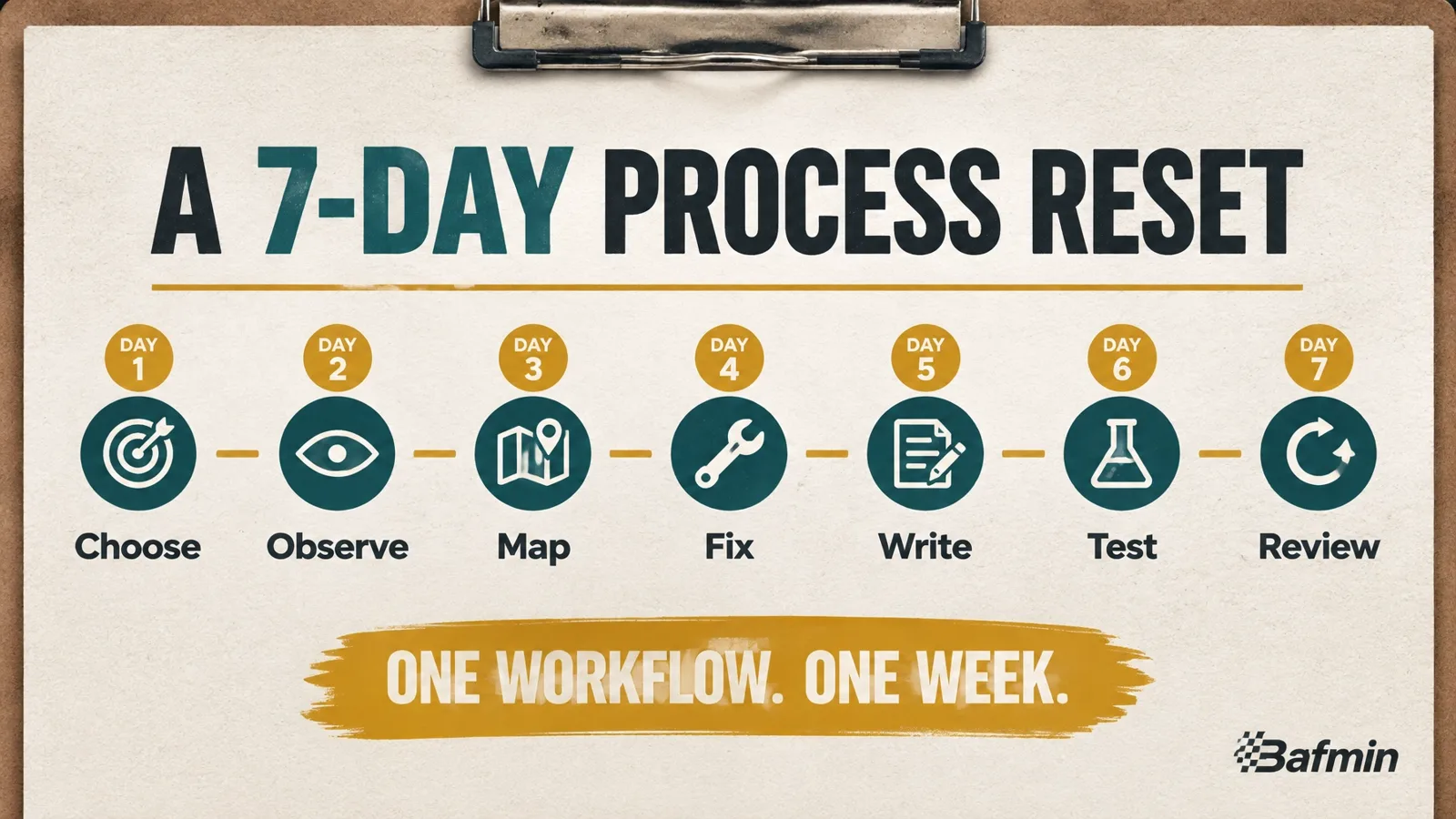
Use the week to improve one workflow. Keep the scope small enough that you can finish.
- Day 1, Choose: Pick one frequent, painful workflow. Define its trigger, end point, owner, and customer outcome.
- Day 2, Observe: Follow a real example. Ask the people involved to show you the steps, including workarounds and waiting.
- Day 3, Map: Put actions, decisions, owners, handoffs, and failure paths on a whiteboard or page. Check the map with the people who do the work.
- Day 4, Fix: Remove unnecessary steps, combine duplicate work, and clarify decisions and ownership.
- Day 5, Write: Turn the improved map into a short SOP. Include the normal path, what “done” means, and what to do when the process fails.
- Day 6, Test: Have someone follow the SOP on a real or safely simulated example. Note every point where they have to guess.
- Day 7, Review: Correct the document, choose a measure to track, name the owner, and schedule the next review.
A week will not solve every operational problem. It can give you one clearer, testable process, and a repeatable method for improving the next one.
The bottom line: Good process design takes observation, honest discussion, and follow-through. Start with the work as it happens, make the next step clear, and improve one workflow at a time. If you would rather build and automate these processes with support, Bafmin helps businesses design and improve operational workflows.